


Carl's Jr.®
4.510.17K Reviews
App Specs
- Version
- 5.6.0
- Updated On
- License
- Free
- Downloads
- 1,000,000+
- Developer
- CKE Restaurants
- Categories
- Food & Drink
- Platform
- Android, iOS
Screenshots
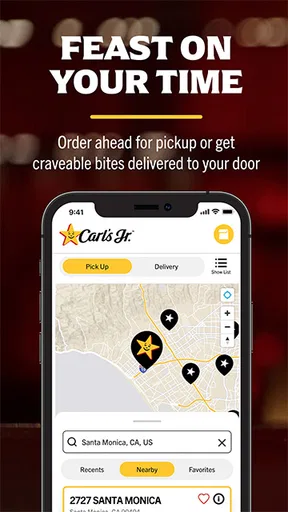
 Analysis by AppCompare
I find restaurant-ordering apps most useful when they prevent a small delay from turning into a whole lunch break. Carl's Jr.® is built for that kind of visit: checking what sounds good, looking for an offer, and arranging an order before heading to a restaurant. The idea is appealing, but the experience depends on a few practical details—especially choosing the right location and allowing time for the handoff. I’d treat it as a convenient companion to a Carl’s Jr. visit, rather than a guarantee that every part of the meal will be quicker.
Where a quick order can get stuck
The most important choice is the restaurant you select. If you are near more than one location, take a moment to check the address before placing an order; choosing a convenient-looking option that is actually out of your way can cancel out the time saved. I would also confirm the pickup or delivery choice before continuing, since those options involve different plans for getting the food.
Offers and rewards can make the app more worthwhile, but they add a step to the decision. I’d check the available deal before settling on a meal, then make sure the offer is reflected in the order before submitting it. That simple sequence is more dependable than assuming a discount will be applied automatically. If you are ordering for someone else, review customizations and the final selection together so a quick tap does not leave out an important preference.
Setup checks that prevent avoidable hassle
Before relying on the app for a time-sensitive lunch, I’d open it while I still have a moment to spare. Check that you have the current version, 5.4.0, and that your device runs Android 10 or later if you are using Android. The app is free, is rated for Everyone, and comes from CKE Restaurants. Those basics help set expectations, but they do not replace checking that your chosen restaurant and order are correct.
Location access can make finding a nearby restaurant easier, but you can also use the location finder to orient yourself and check the restaurant details before setting off. If the app does not show the place you expected, verify the town or address rather than assuming the nearest result is the right one. I’d also avoid beginning an order while moving between areas: choosing a location after you have stopped is less likely to leave you with the wrong pickup plan.
The app has an average rating of 4.6 from around 24,000 ratings, with more than a million installs, so it is clearly used by many people. I still wouldn’t take popularity as a promise that every restaurant visit will be friction-free. Its strongest case is for someone who already knows they want Carl’s Jr. and can spare a moment to check the details before ordering.
Making the order work in everyday use
I use this section to focus on the small choices that make an order easier to manage, especially deciding where to collect it before I start browsing. A quick pause to check the restaurant and review the finished order can prevent a rushed correction later, while leaving room for the visit itself to take longer than expected.
Worth Reading Before You Choose

EA SPORTS FC Mobile 26 Is a Bigger Football Game, but It Takes Time

Flipboard Shows What News Apps Must Do Beyond the Feed

Switching to Android Auto Means Rethinking Your Driving Routine

Google Calendar Makes a Crowded Week Easier to Manage

Ludo King Makes the Most of the Minutes Between Plans

Baby Panda World Brings Quick Play to Modern Phones, but Its Game Library Feels Busy
Recovering when the workflow goes off track
If something seems wrong, pause before placing a second order. First review the selected restaurant, the items, any customizations, and whether you chose pickup or delivery. If you have already submitted the order, use the confirmation and the information shown in the app to understand what you placed before taking another step. Sending a duplicate order in a hurry may create more trouble than waiting a moment to check.
For a deal that does not appear as expected, revisit the offer and check the order before submitting. For a location mismatch, return to the location finder and select the intended restaurant again. These are simple checks, but they address the kinds of mistakes a rushed user can actually prevent. If the app itself stops responding, closing and reopening it or checking your internet connection are reasonable general steps; I would not assume that repeating the same tap will solve a stalled screen.
When the app is not the cause
An app can help organize an order, but it cannot remove every source of delay. A busy restaurant, a longer trip than expected, or a change in plans can affect how useful pickup feels. If timing matters, leave a little breathing room instead of treating an estimated ready time as an appointment. For delivery, consider whether waiting at home is genuinely easier than collecting the meal yourself; convenience depends on the situation, not just the button you choose.
I would also separate a problem with the ordering process from a problem with the food or the visit itself. The app’s role is to help you browse, choose, and place an order. If the restaurant is not convenient or the menu is not what you want, switching screens will not fix that basic mismatch. In that case, deciding on another meal or another way to order is more sensible than pushing through a workflow that no longer suits your plans.
Who gets the most from it
This is a good fit for regular Carl’s Jr. customers who like to check offers, repeat familiar choices, or arrange pickup before arriving. It can also help when you are in an unfamiliar area and want to look for a nearby restaurant before changing your route. A realistic use is a short lunch break: while still at your desk, you can browse, choose the location near your next stop, and review the order before leaving. The benefit is less uncertainty at the counter, not a promise that the whole trip will take a fixed amount of time.
It is less compelling if you rarely eat at Carl’s Jr., prefer choosing only after seeing what is available in person, or do not want to manage an account and rewards activity. Someone comparing several nearby restaurants may be better served by a general food-ordering app or by checking each restaurant’s options directly. Those alternatives can make cross-restaurant comparisons easier; this app’s advantage is its focus on Carl’s Jr. choices and offers, not being a universal dining guide.
What the app does—and what it cannot decide for you
Browsing the menu before a visit is useful when you are deciding between familiar items or want to think through a customization without holding up a line. I’d use that time to keep the order straightforward: make the changes that matter, then check them once. More elaborate adjustments are worth reviewing carefully, because a small-screen menu can make it easy to overlook a selection when you are moving quickly.
The rewards angle is most relevant if you expect to return. For an occasional visit, a deal may still be useful, but I would not choose a meal solely to chase points or an offer. Compare what you actually want with what the app presents, and treat savings as a bonus rather than the reason to order. That keeps the app helpful instead of turning lunch into a series of extra decisions.
My practical verdict
As a free food-and-drink app, Carl’s Jr. earns its place on my phone when I already have a visit in mind. It brings menu browsing, location finding, ordering, and rewards into one restaurant-specific experience, and its 4.6 average rating suggests many users find that useful. Its value is strongest when I check the location and order before setting out; it is weaker when I need to compare restaurants, make an unplanned choice, or rely on a precise arrival schedule.
The app has been available since July 27, 2021, and its current version is 5.4.0. I’d recommend trying it if Carl’s Jr. is already part of your routine, particularly if checking offers or arranging pickup fits how you eat. If you only visit occasionally, you can still use it when a menu or location check would help, but there is no need to make it your default food app. My rule is simple: decide where you want to eat first, then use the app to make that specific visit easier.
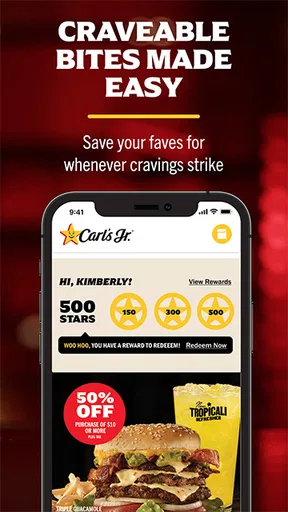
So, let’s dive right into it. When I first downloaded the Carl's Jr.® app, I was greeted with a slick and user-friendly interface. It’s got that modern look without being overly complicated. Right off the bat, you can see everything you need: menu items, special offers, and even a location finder. Everything is just a tap away, which is super helpful when you’re on the go.
Menu Exploration
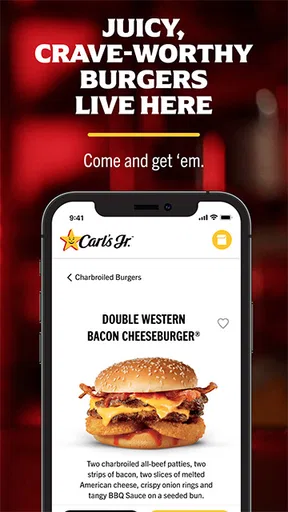
Now, onto the good stuff—the food. Navigating through the menu on the app is like being a kid in a candy store. You’ve got your classic favorites like the Famous Star® with Cheese, but there are also some delightful surprises. The app showcases detailed images and descriptions that make your mouth water just by looking at them. I love how easy it is to customize your order, too. Want extra pickles or no onions? No problem at all. The app lets you make those tweaks effortlessly.
Special Offers and Rewards
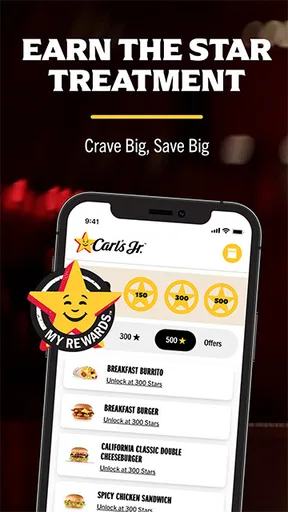
If you’re a fan of saving money (and who isn’t?), the app’s special offers section is where you’ll want to hang out. There are exclusive deals and rewards that you won’t find anywhere else. Signing up for the rewards program is a breeze, and trust me, the perks are worth it. Whether it’s a free drink or a discount on your favorite burger, these offers can turn a regular lunch into a budget-friendly feast.
Ordering and Pickup—A Seamless Experience
Ordering through the app is as easy as pie—actually, easier. You can choose between pickup or delivery, depending on how lazy you’re feeling that day. For me, the pickup option is a lifesaver. You place your order, get a confirmation, and then swing by your nearest Carl’s Jr. to grab it. No more waiting in line! The app estimates your order’s ready time, so you’re not left awkwardly standing by the counter.
Finding Your Nearest Carl’s Jr.
One of the standout features is the location finder. Whether you’re in your hometown or exploring a new city, the app makes it super easy to locate the nearest Carl’s Jr. restaurant. It uses your current location to show you options, complete with addresses and directions. It’s like having a personal burger GPS!
Final Thoughts
All in all, the Carl's Jr.® app is a must-have for any fast-food fan. It’s convenient, user-friendly, and packed with features that make ordering your favorite meal a breeze. Whether you’re a regular or just an occasional visitor, this app enhances the whole experience. So why not give it a try? Download it, explore the menu, and treat yourself to some deliciousness without the hassle. Happy munching!
Pros
- User-friendly interface with easy navigation.
- Quick access to exclusive offers and discounts.
- Convenient mobile ordering for pickup or delivery.
- Customizable orders to match your preferences.
- Loyalty rewards program for frequent users.
Cons
- Limited menu options compared to in-store.
- Occasional app crashes during peak hours.
- Location services can be inaccurate.
- Limited payment options available.
- Some features require stable internet.
FAQs for Carl's Jr.®
What features does the Carl's Jr.® app offer?
The Carl's Jr.® app provides a wide range of features designed to enhance user experience. Users can explore the full menu, find nearby locations, and access exclusive deals and promotions. Additionally, the app offers online ordering for convenient pickup or delivery, along with nutritional information for menu items.
How does the rewards program work in the Carl's Jr.® app?
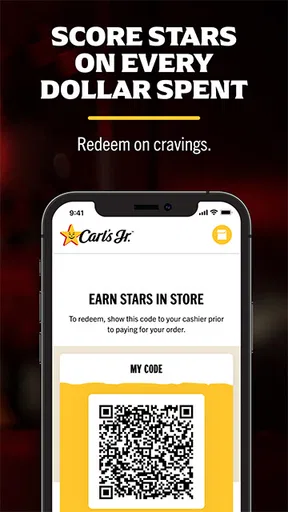
The rewards program in the Carl's Jr.® app allows users to earn points for every purchase made through the app. Once enough points are accumulated, they can be redeemed for free food or other exclusive offers. The app makes it easy to track points and available rewards directly from your smartphone.
Is the Carl's Jr.® app available for both Android and iOS devices?
Yes, the Carl's Jr.® app is available for both Android and iOS platforms. Users can download the app from the Google Play Store for Android devices and the Apple App Store for iOS devices, ensuring compatibility with a wide range of smartphones and tablets.
Can I customize my order using the Carl's Jr.® app?
Absolutely! The Carl's Jr.® app allows users to customize their orders based on personal preferences. Whether you want to add extra toppings, remove ingredients, or make other modifications, the app provides a seamless customization process to ensure your meal is exactly how you like it.
Are there any security concerns with using the Carl's Jr.® app?
The Carl's Jr.® app is designed with user security in mind. It employs encryption and secure payment gateways to protect personal and financial information. Users are encouraged to regularly update the app to benefit from the latest security enhancements and features. Always download the app from official stores for added safety.


